Outgrowing Your Website Platform: How We Build High Performance Webflow Sites for SEO, Design and Scale



Introduction: When Your Website Stops Pulling Its Weight
There’s a moment most growing businesses reach where their website quietly changes role. It stops being a driver of growth and starts becoming something that needs managing. Updates stack up. Plugins conflict. Page speed slips. SEO improvements feel harder than they should. You don’t necessarily notice it all at once, but you feel it.
That’s usually when the question isn’t “Do we need a new website?” but “Why does this feel harder than it used to?”
At Temple Brown, this is where most conversations begin. Not with a platform comparison, and not with a sales pitch, but with a simple reality check. Where is your business now, and where is it trying to go next?
After launching multiple Webflow websites across the UK, Europe and the US, and working with industries ranging from beauty to cyber security, we’ve seen the same pattern repeat itself. Platforms don’t suddenly fail. Businesses outgrow them.
WordPress works. Until it doesn’t. And when it stops working, it rarely does so dramatically. It becomes slower to adapt, harder to optimise, and more expensive to maintain. Progress stalls. Momentum dips. Frustration creeps in.
Webflow, for us, isn’t a trend or a preference. It’s a response to those moments.
Built on Delivery, Not Theory
It’s important to be clear about where this perspective comes from.
We’ve designed and launched Webflow websites for organisations based in Norwich, across East Anglia, in London, and for teams operating nationally and internationally. Many of these businesses serve audiences far beyond their immediate location. Some work in highly regulated sectors. Others depend heavily on brand, visual identity and emotional connection to convert.
Our projects page reflects that breadth. Not just in how things look, but in how they perform across markets, devices and expectations.
What matters here is experience at scale.
When you build one website on a platform, almost anything can be made to work. When you build many, across regions and industries, patterns emerge quickly. Weaknesses surface. Workarounds stack up. Complexity grows.
That’s where Webflow’s technical and creative capabilities start to stand out.
The SEO Reality Check Most Agencies Avoid
Let’s address something honestly.
Google doesn’t always reward agencies with strong rankings for SEO related terms. That includes us. Agency search results are saturated, competitive, and driven by intent that often favours businesses seeking help rather than agencies explaining how they work.
That doesn’t mean SEO isn’t central to what we do. It means we measure success differently.
We judge SEO by client outcomes, not agency visibility.
The websites we build are structured from day one with search performance in mind. Clean, semantic HTML. Logical content hierarchy. Predictable page performance. Thoughtful internal linking. These fundamentals are far easier to control when SEO is part of the build process, not something layered on later with plugins and patches.
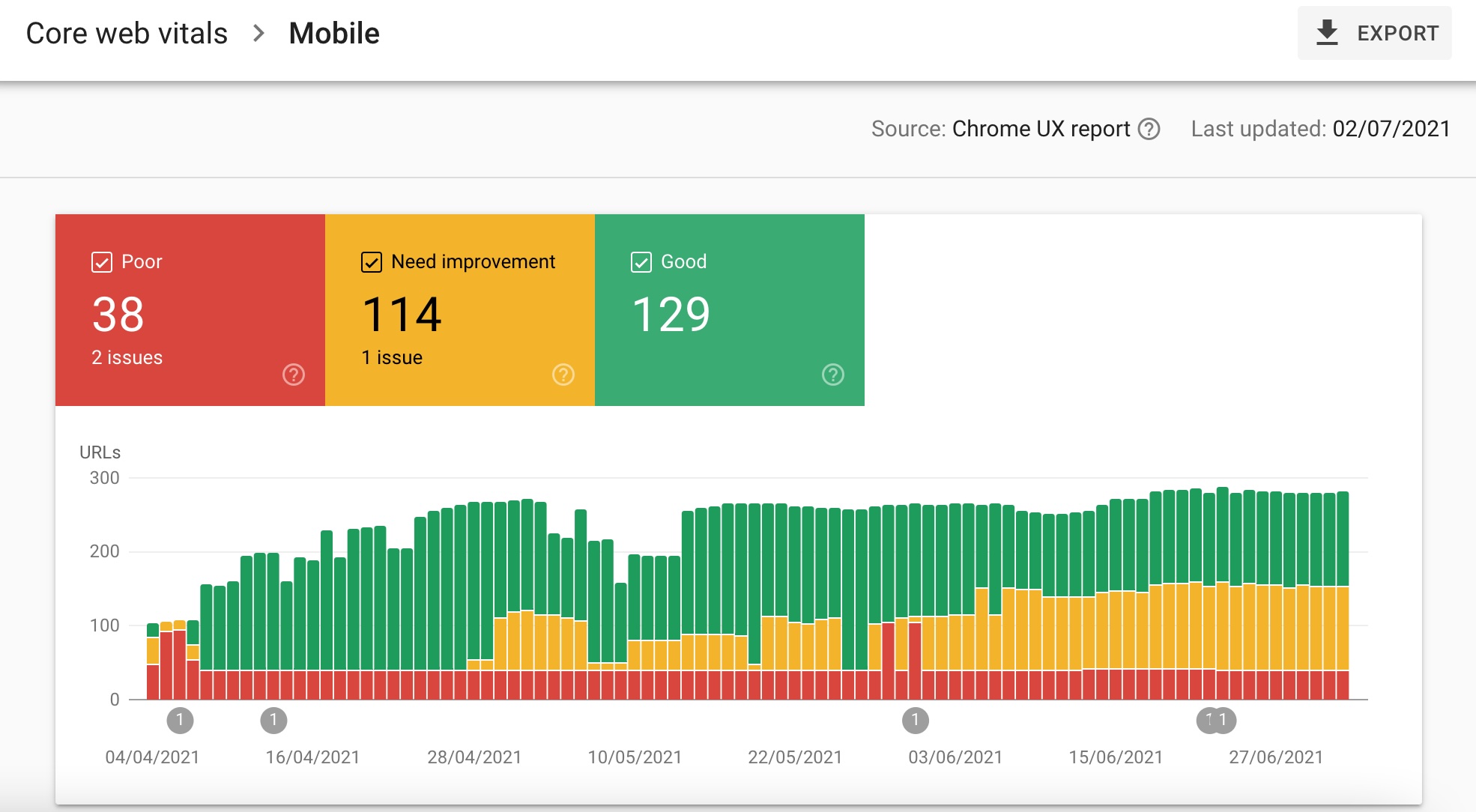
Google has been clear for some time that page experience, performance and usability play a role in how sites are assessed, particularly in competitive and international search environments. Core Web Vitals, crawl efficiency and rendering consistency all matter. Platforms that introduce unnecessary complexity make these harder to manage, not easier.
This is one of the main reasons Webflow has become central to how we build.
Why Scale Changes Everything
A website serving a local audience has very different demands to one serving users across the UK, Europe or the US. Hosting reliability, load speed consistency, and predictable behaviour across devices suddenly become far more important.
When we launch sites for cyber security companies, clarity and trust are non negotiable. When we work with beauty brands, visual polish, motion and emotional engagement matter just as much as performance. In both cases, SEO cannot be sacrificed for design, and design cannot be compromised for technical convenience.
This is where many traditional builds begin to creak.
Layered systems rely heavily on third party dependencies. Updates introduce risk. Design ambition is quietly dialled back because it’s harder to implement cleanly. SEO becomes reactive rather than structural.
Webflow approaches this differently. It allows us to control structure, performance and presentation within a single environment, which becomes increasingly valuable as complexity grows.
Norwich, East Anglia and London: Regional Roots, National Expectations
We’re based in Norwich, and many of the businesses we work with are rooted in East Anglia. It’s a region full of ambitious companies who expect their digital presence to compete nationally and internationally, not just locally.
At the same time, we regularly collaborate with London based teams, particularly in technology and cyber security, where expectations around performance, scalability and credibility are high. These projects act as pressure tests. If a platform or process doesn’t hold up there, it doesn’t hold up anywhere.
Webflow has proven itself repeatedly in these environments. Not because it’s flashy, but because it’s stable, predictable and flexible in the right ways.
Webflow’s Technical SEO Capabilities
Clean Structure Beats Patches Every Time
Search engines don’t rank websites because of the platform they’re built on. They rank websites because they can understand them, crawl them efficiently, and assess them consistently.
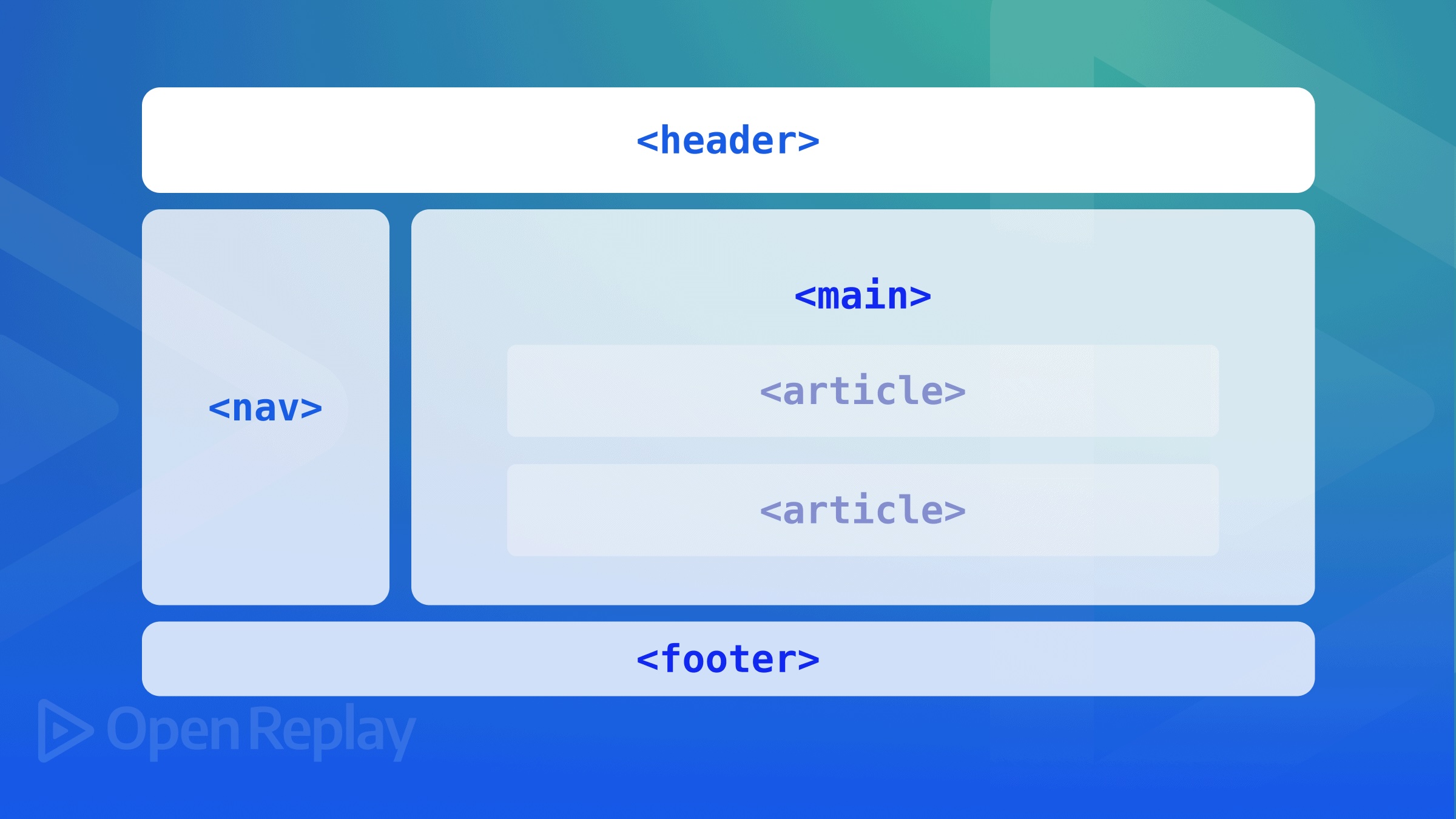
Webflow outputs clean, semantic HTML by default. That might not sound glamorous, but it matters. Heading structures are logical. Content hierarchy is clear. Navigation is readable. There’s less noise for crawlers to work through before they reach what matters.
By comparison, heavily customised WordPress builds often rely on themes, page builders and plugins that all inject their own markup. The result is bloated code, duplicated elements and unnecessary complexity. It still functions, but it becomes harder to audit, harder to optimise and harder to scale cleanly.
When SEO is built into the structure rather than layered on top, fewer things break later.
Core Web Vitals and Performance by Design
Google has been clear that page experience matters. Core Web Vitals aren’t a nice to have, especially in competitive search results or international markets where user expectations are high.
The challenge for many businesses is that performance becomes reactive. A site launches. Scores disappoint. Then comes the cycle of optimisation plugins, caching layers and endless testing.
Webflow flips that process around.
Because hosting, rendering and asset delivery are handled as part of the platform, performance is more predictable. Designers and developers see the impact of decisions in real time. Animation choices, layout decisions and image handling are made with speed in mind from the outset.
That doesn’t mean every Webflow site is automatically fast. It means speed is easier to plan for, measure and maintain, which is exactly what long term SEO requires.
Crawl Efficiency, Indexing and International Scale
As websites grow, crawl efficiency becomes increasingly important. Search engines have finite resources. They prioritise sites that are easy to understand and cheap to crawl.
Webflow avoids many of the pitfalls that cause problems here. Pages are static by default. URLs are clean. There’s no reliance on heavy server side processing or unpredictable rendering just to display content.
For businesses publishing regularly, expanding internationally, or managing large content libraries, this consistency matters. Pages are indexed more reliably. Changes are picked up faster. SEO teams spend less time firefighting and more time improving content quality.
That’s not theoretical. It’s practical, day to day reality.
Hosting, Security and Global Delivery
Launching websites for audiences across the UK, Europe and the US quickly exposes weaknesses in traditional hosting setups. Regional load speed differences. Configuration complexity. Security concerns. Scaling issues during traffic spikes.
Webflow’s cloud based hosting removes much of that friction. Content is delivered efficiently across regions without manual configuration. SSL is standard. Infrastructure scales without constant intervention.
For businesses in Norwich or East Anglia serving national or international audiences, this matters just as much as it does for London based teams. Geography stops being a limitation.
SEO Control Without Dependency
One of Webflow’s biggest technical advantages is control without dependency.
Metadata, indexing rules, canonical tags, redirects and page settings are all accessible without plugins. That reduces risk. Fewer moving parts mean fewer things break during updates. SEO decisions stay intentional rather than accidental.
For us, this aligns perfectly with how we work. SEO is not an add on. It’s part of the build process. The cleaner the system, the easier it is to maintain that discipline as sites evolve.
A Practical Way to Choose the Right Platform
One thing we’ve learned after launching Webflow websites across multiple regions and industries is that there isn’t a single right platform for every business. The real problem is that most people are forced to choose without clarity.
That’s why we’ve built a free website platform checker tool. It’s designed to help you understand whether your current setup is supporting your goals, or quietly getting in the way, based on performance, SEO needs, scalability and design requirements.
It’s not a sales gimmick. It’s a practical starting point for making an informed decision.
Design Isn’t Decoration, It’s Communication
Design is often treated as the part of a website you “make pretty” once the important technical work is done. In reality, it’s doing far more heavy lifting than most businesses realise.
Before a single word is read, users are already making decisions. Do they trust this brand. Does this feel credible. Is this company serious about what it does. Should I stay or leave.
Research from organisations like Nielsen Norman Group has consistently shown that visual clarity, layout stability and perceived quality all play a role in how trustworthy a website feels. This directly affects engagement, bounce rate and ultimately conversion.
When we design Webflow websites, particularly for clients in sectors like cyber security or premium beauty, we’re not chasing visual trends. We’re designing for comprehension, confidence and flow.
This is where Webflow’s design system matters.
Animation Done Properly Supports SEO, Not the Other Way Around
There’s a persistent myth that animation is bad for SEO. What’s actually bad for SEO is poorly implemented animation.
Heavy scripts. Plugin driven effects. Layout shifts that frustrate users. Long load times. These are the things search engines and users both dislike.
Webflow approaches motion differently. Animations are native. They’re tied to interaction, not excess JavaScript. That means we can introduce motion that guides attention, reinforces hierarchy and improves understanding without sacrificing performance.
Google’s own documentation on page experience makes it clear that stability and usability matter. Sudden layout shifts and unpredictable behaviour damage user experience, which in turn affects how pages are assessed.
This is why meaningful motion matters.
Subtle transitions. Clear state changes. Micro interactions that respond to intent. All of these help users understand where they are and what to do next. When done properly, they reduce friction rather than add to it.
Proof of Concept: Beauty, Cyber Security and Everything Between
Theory is useful. Delivery is better.
Across our projects, we’ve launched Webflow websites for brands where design is the product, and for organisations where trust and clarity are non negotiable. Beauty brands need fluidity, emotion and polish. Cyber security companies need restraint, confidence and credibility.
In both cases, animation plays a role, but it plays a different one.
For beauty clients, motion enhances storytelling. It creates rhythm. It brings brand personality to life without overwhelming content. For cyber security, motion is used sparingly, reinforcing structure and guiding attention without distracting from the message.
You can see examples of this range of work on our internal projects page, which demonstrates how Webflow adapts across industries rather than forcing everything into the same template.
That adaptability is key.
Performance, Engagement and Why Google Cares
Google doesn’t rank animations. It ranks outcomes.
Engagement metrics, page experience signals and user behaviour all feed into how pages perform over time. Studies referenced by Google Search Central and the Chrome UX Report consistently highlight the importance of stability, speed and usability.
When animation is native, predictable and lightweight, it doesn’t harm these signals. When it’s layered on through third party tools and scripts, it often does.
This is one of the reasons we favour Webflow for design led builds. It allows us to control motion within the same system as structure and performance. Design decisions aren’t fighting technical constraints. They’re informed by them.
That balance is hard to achieve on platforms where animation relies heavily on plugins or external libraries.
Design Systems That Scale With Content
Another often overlooked advantage of Webflow is how well it supports design systems.
As websites grow, consistency becomes more important than novelty. Reusable components. Predictable interactions. Clear patterns. These things matter for users and for SEO.
A well structured design system makes it easier to publish content without breaking layout, hierarchy or performance. It reduces reliance on developers for simple updates. It keeps branding coherent as teams and markets expand.
For businesses operating across regions like the UK, Europe and the US, this consistency is critical. What works on a campaign page needs to work just as well on a service page, a blog post or a landing page six months later.
Webflow handles this elegantly, which is why it scales so well for growing teams.
Internal Proof Meets Practical Decision Making
One of the reasons we built our free website platform checker tool was to address a recurring problem. Businesses are often told they need a new platform, but rarely shown why.
Design and animation capability is part of that decision. So is SEO. So is scalability. The tool brings those considerations together in a practical way, helping teams understand whether their current setup supports their goals or quietly holds them back.
It’s not about pushing everyone towards Webflow. It’s about clarity.
That clarity is informed by experience, delivery and patterns we’ve seen across dozens of launches, not assumptions.
Why This Matters for SEO in the Long Run
Search performance isn’t just about keywords and backlinks. It’s about how users experience your site once they arrive.
Clear design reduces bounce rates. Meaningful motion improves engagement. Stable layouts improve usability. All of these contribute to stronger performance signals over time.
When design, animation and SEO are aligned rather than competing, websites perform better across the board. That’s what we aim for with every Webflow build.
Webflow, Content Strategy and Long Term SEO Growth
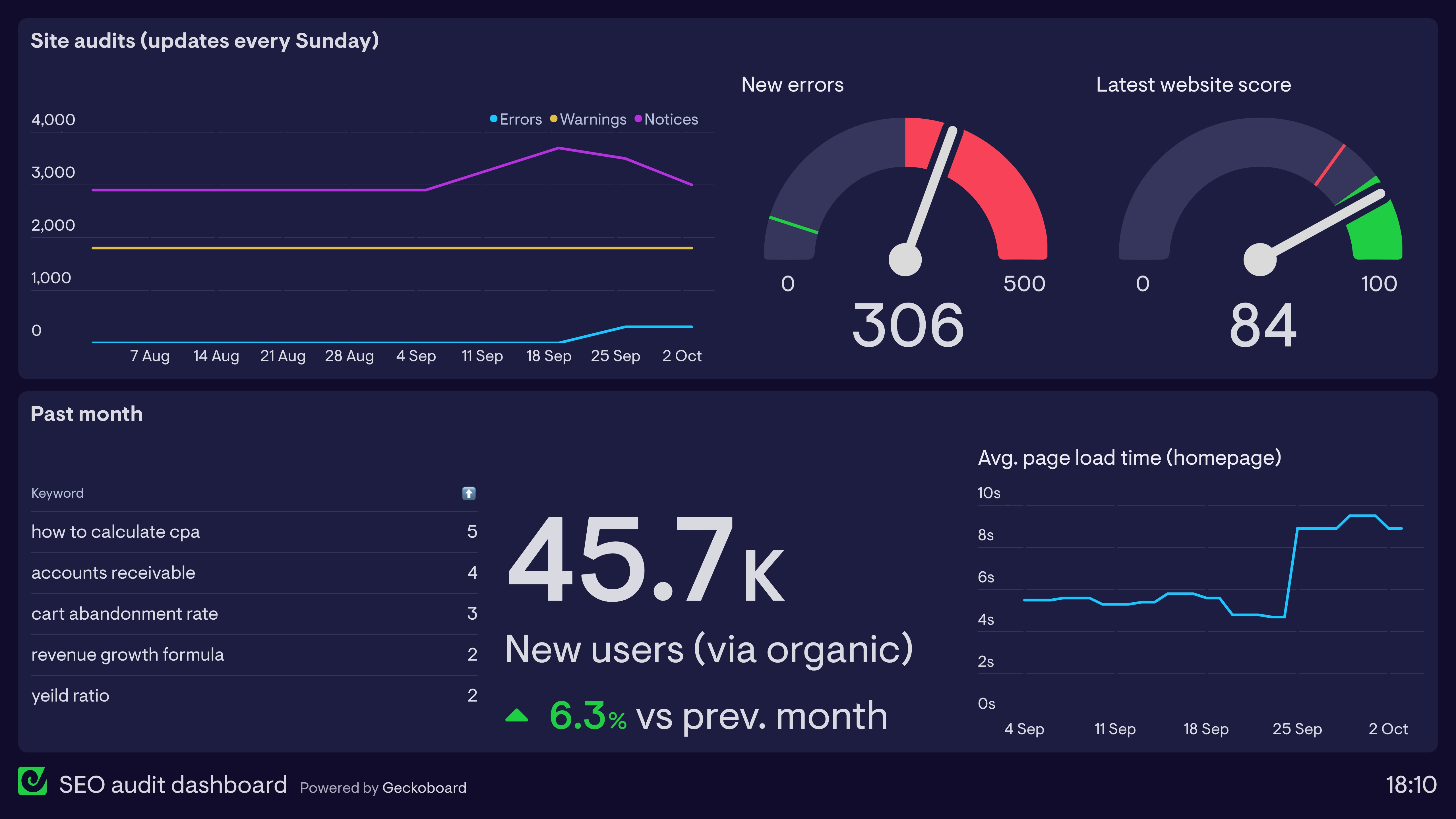
Why Long Term SEO Is a Systems Problem, Not a Campaign One
One of the most common frustrations we hear from growing businesses is that SEO feels unpredictable. One month traffic is up, the next it stalls. A new page ranks briefly, then disappears. Effort doesn’t always seem to correlate with outcome.
In our experience, this rarely comes down to a lack of effort. It comes down to systems.
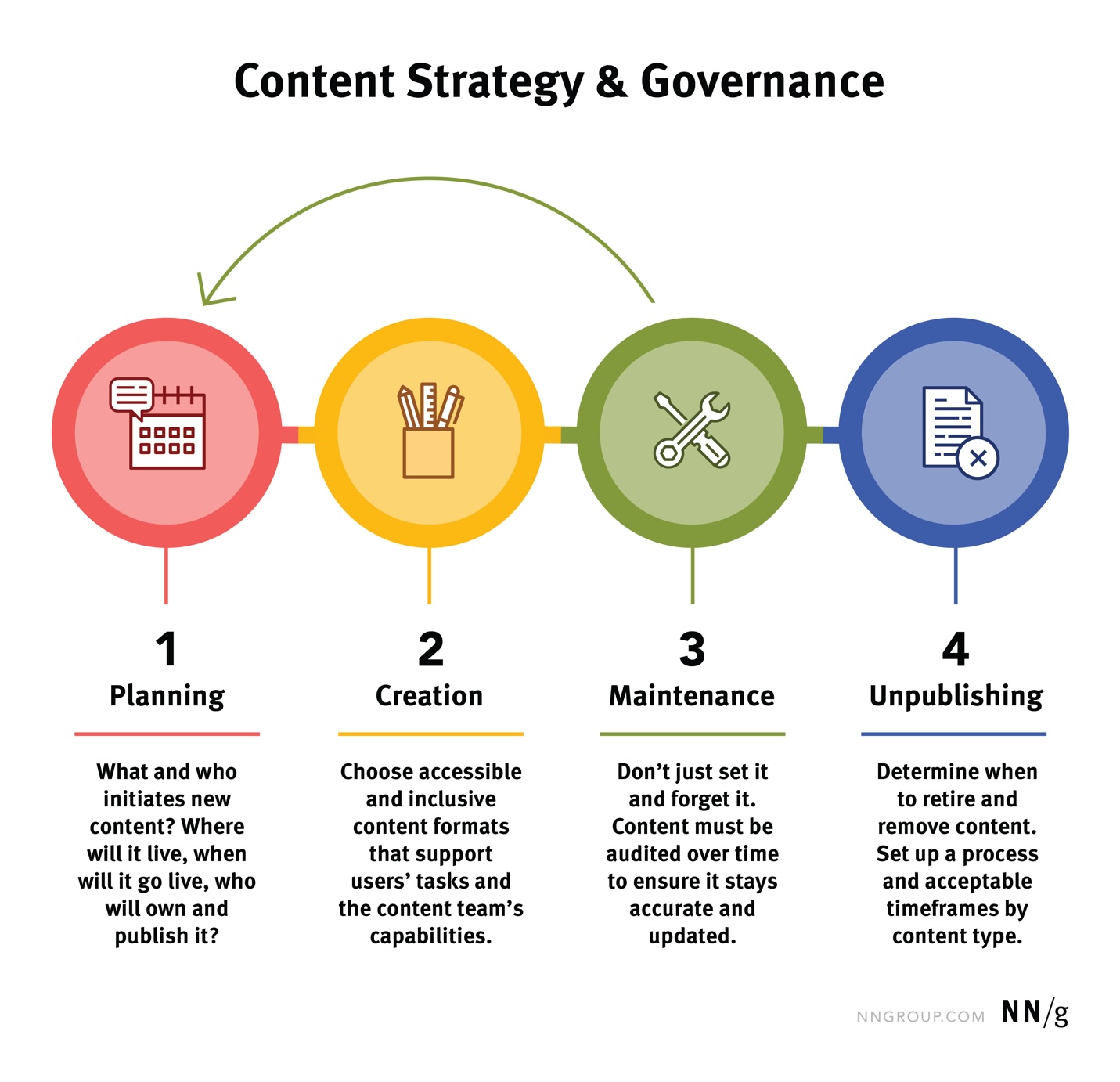
SEO works best when content, structure, performance and governance are aligned. When any one of those breaks down, progress slows. This is where platform choice quietly becomes strategic rather than technical.
Webflow supports long term SEO growth not because it promises rankings, but because it removes friction from the systems that support them.
Content Teams Need Confidence, Not Complexity
As websites grow, content becomes the engine of search performance. Blogs, resources, service pages, landing pages and location content all play a role. The challenge is keeping quality and consistency high without slowing teams down.
On many platforms, content publishing becomes cautious. Editors worry about breaking layouts. Marketers rely on developers for simple changes. SEO improvements are delayed because no one wants to touch the structure.
Webflow changes that dynamic.
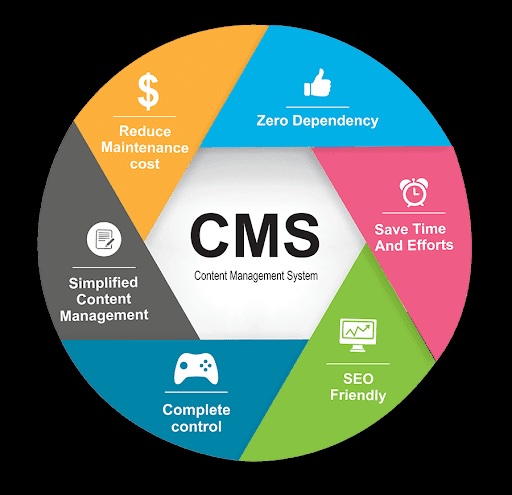
Its CMS is flexible without being fragile. Content teams can publish confidently within defined structures. Design systems protect layout and hierarchy. SEO fundamentals such as headings, metadata and internal linking are visible and intentional rather than hidden behind layers of plugins.
That confidence matters. The easier it is to publish well structured content, the more likely teams are to do it consistently. Consistency is where long term SEO gains are made.
Scaling Content Across Regions Without Losing Control
For businesses operating across the UK, Europe and the US, content strategy quickly becomes more complex. Regional messaging. Local relevance. Search intent differences. All of this needs managing without fragmenting the site.
Webflow supports this through clean URL structures, flexible CMS collections and predictable behaviour across pages. Regional content can be introduced without compromising performance or creating technical debt.
From an SEO perspective, this makes governance easier. From a business perspective, it reduces risk.
We’ve seen this play out repeatedly on projects where sites start locally and then expand. Platforms that feel flexible early on often struggle to stay coherent as complexity grows. Webflow scales more gracefully because structure is enforced, not improvised.
Internal Linking, Architecture and SEO Compounding
Internal linking is one of the most underused levers in SEO. Not because it’s difficult, but because it’s often messy.
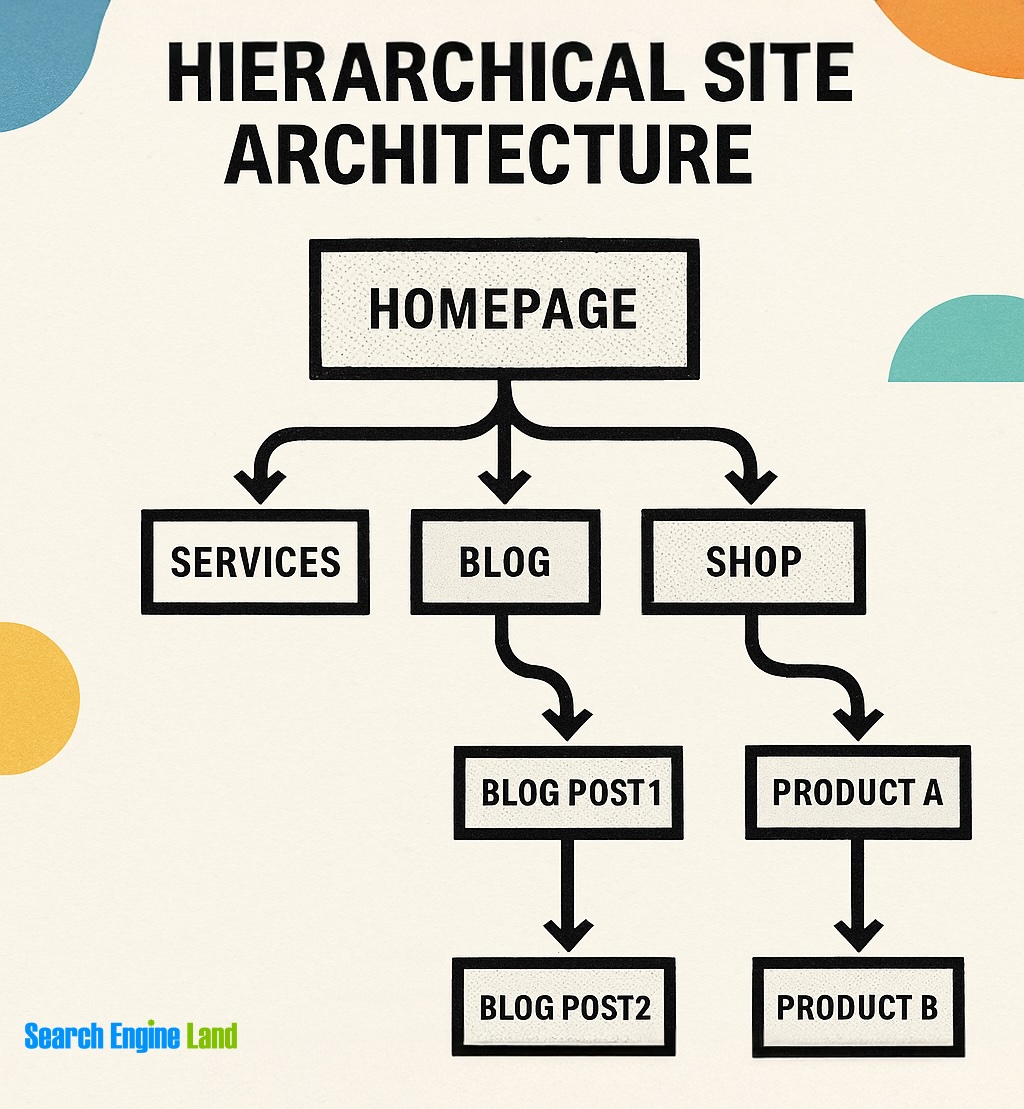
When site architecture is unclear or inconsistent, internal linking becomes reactive. Links are added opportunistically rather than strategically. Pages compete with each other. Authority is diluted.
Webflow encourages clearer architecture from the start. CMS driven content, reusable components and consistent templates make it easier to plan internal linking as part of content strategy, not an afterthought.
Over time, this compounds. Pages support each other. Topical authority strengthens. Search performance becomes more stable.
This is the kind of SEO growth that doesn’t spike dramatically, but doesn’t disappear either. It’s the kind most businesses actually want.
Proof of Concept: Content That Evolves Without Rebuilding
Across our projects, we’ve worked with businesses that started with a relatively simple content setup and then expanded significantly. More services. More resources. More markets. More ambition.
In those cases, the real test isn’t launch day. It’s year two and three.
Webflow allows content models to evolve without forcing a rebuild. New collections can be added. Templates can be extended. SEO improvements can be rolled out systematically.
That flexibility, combined with structural discipline, is why it performs so well over time.
You can see examples of this evolution across our projects, where sites have grown in depth and complexity without losing performance or coherence.
External Signals, Authority and Why SEO Is More Than On Site Work
It’s also important to acknowledge that SEO doesn’t exist in a vacuum. External signals matter. Brand searches. Mentions. Links. Authority.
Google’s own guidance through platforms like Google Search Central consistently reinforces the importance of relevance, experience and trust. Websites that are technically sound and easy to use are better positioned to benefit from those signals when they appear.
In other words, Webflow doesn’t replace SEO strategy. It supports it by ensuring the foundations don’t get in the way.
This is why we’re careful not to oversell platforms. The right CMS makes good SEO easier to execute and sustain. It doesn’t do the work for you.
Making Platform Choice a Strategic Decision
This brings us back to the reason we built our free website platform checker tool.
After years of seeing businesses switch platforms reactively, often after months of frustration, we wanted to create a clearer starting point. Something practical. Something grounded in real delivery experience.
The tool looks at performance, SEO needs, scalability and design requirements to help teams understand whether their current setup is supporting their goals or quietly holding them back.
It’s not about forcing a move. It’s about making an informed decision.
Where This Leaves You
If there’s one thing we’ve learned from building Webflow websites across regions and industries, it’s that sustainable growth comes from alignment. Platform, design, content and SEO all pulling in the same direction.
When that happens, websites stop being projects and start being assets again.
When Webflow Is the Right Choice, When It Isn’t, and What to Do Next
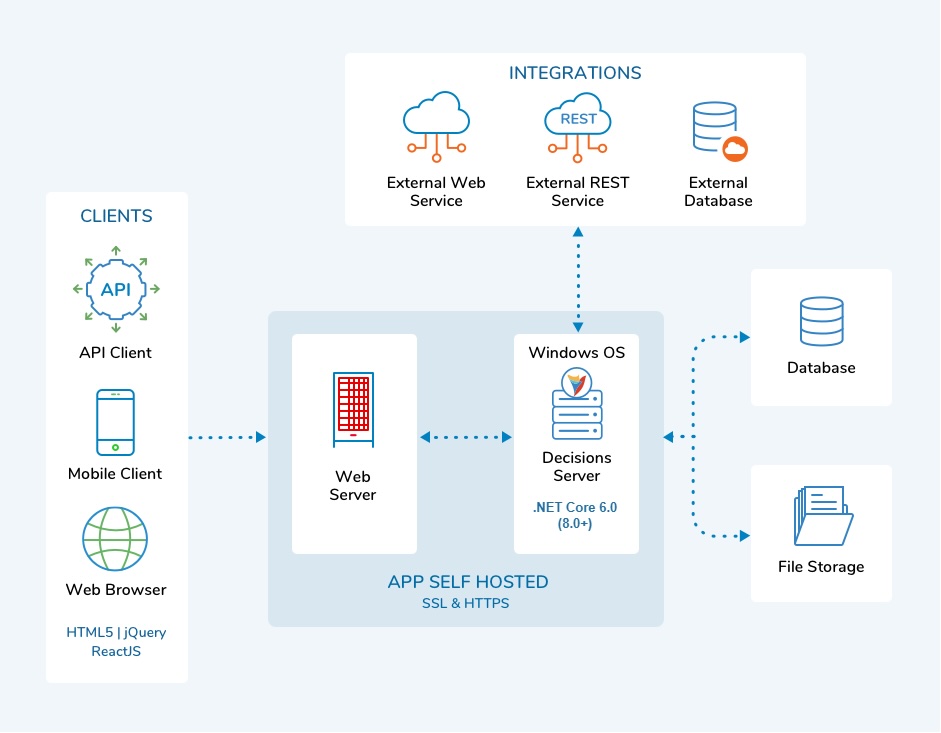

There Is No Perfect Platform, Only the Right One for Where You Are
By this point, one thing should be clear. This isn’t a Webflow sales pitch.
If there’s a single mistake businesses make when choosing a website platform, it’s looking for a universal answer. There isn’t one. Platforms are tools. The value comes from how well they align with your goals, your team and your stage of growth.
Webflow is incredibly strong, but it isn’t always the right choice. And saying that openly matters.
The real question isn’t “Is Webflow better than WordPress?”
It’s “Is our current setup helping us move forward, or quietly slowing us down?”
That’s a very different conversation.
When Webflow Tends to Be the Right Fit
In our experience, Webflow works best for businesses that have reached a certain point of maturity.
Teams that care about performance, SEO and brand consistency, not just launch speed. Businesses that publish content regularly and want confidence that updates won’t break layouts or undermine structure. Organisations that expect their website to scale across markets, services or audiences over time.
We see this often with companies based in Norwich and across East Anglia who are no longer thinking locally, but competing nationally or internationally. We see it with London based teams who expect their website to perform under scrutiny from investors, partners or enterprise clients.
In these cases, Webflow’s balance of structure and flexibility becomes an advantage. It supports growth without demanding constant maintenance. It allows design, content and SEO to work together rather than in competition.
When Webflow Might Not Be the Right Answer
Just as important is knowing when not to recommend it.
If a business relies heavily on complex third party integrations that are tightly coupled to a specific CMS ecosystem, another platform may be more appropriate. If internal teams are already deeply invested in a custom WordPress setup that’s performing well and scaling cleanly, there may be no need to change.
Likewise, very early stage projects with minimal content, limited growth plans and tight budgets may not benefit immediately from a move. Platform choice should always be proportional to ambition.
Being honest about this builds trust. It also leads to better outcomes.
Why Most Platform Decisions Happen Too Late
What we’ve noticed over the years is that platform changes are usually reactive. They happen after months of frustration. After SEO performance has plateaued. After content publishing becomes awkward. After design compromises stack up.
By then, the decision feels risky.
That’s why we encourage businesses to assess their platform before things reach breaking point. Not because change is inevitable, but because clarity is valuable.
It’s far easier to make a calm, informed decision than an urgent one.
A Practical Starting Point, Not a Hard Sell
This is exactly why we built our free website platform checker tool.
It’s designed to help you step back and look at your current setup objectively. Performance. SEO needs. Scalability. Design and animation requirements. Team workflows.
The goal isn’t to push everyone towards Webflow. The goal is to help you understand whether your website is supporting your direction of travel, or quietly resisting it.
That clarity alone often changes the conversation internally.
Where Temple Brown Fits Into This
Our role isn’t to sell platforms. It’s to help businesses move forward with confidence.
Sometimes that means building in Webflow. Sometimes it means refining what’s already there. What stays consistent is our focus on structure, performance, SEO and design working together as a system.
After launching Webflow websites across the UK, Europe and the US, and working with industries as varied as beauty and cyber security, we’ve learned that long term success comes from alignment, not shortcuts.
When platform, content, design and SEO are pulling in the same direction, websites stop feeling like a problem to manage and start behaving like assets again.
The Bottom Line
If your website feels harder to manage than it should, slower to adapt than your business, or less effective than you’d like, it’s probably not a motivation problem. It’s a systems problem.
And systems can be improved.
Whether that leads to Webflow or not, the important thing is making the decision with clarity rather than frustration.
That’s always the better place to start.
Frequently Asked Questions
How do I know if my current website platform is holding my business back?
Most businesses don’t notice platform friction immediately. It usually shows up as small frustrations that slowly become normal. Publishing content feels harder than it should. Performance scores fluctuate without clear reasons. SEO improvements stall despite effort. Design changes start to feel risky.
These issues are rarely caused by a lack of skill. More often, they point to a platform that no longer matches the scale or direction of the business. When workarounds become routine and progress feels slower than expected, it’s usually a sign that the system itself needs reviewing.
Taking a step back to assess whether your platform still supports your goals can prevent rushed decisions later, when frustration is already high.
Is Webflow actually better for SEO than WordPress?
There isn’t a single platform that guarantees SEO success. What matters is how consistently SEO best practice can be applied and maintained over time.
Webflow often performs well because it produces clean, semantic markup, predictable performance and fewer dependencies. This reduces technical SEO risk and makes issues easier to diagnose. WordPress can also rank extremely well, but SEO performance often depends on themes, plugins and ongoing maintenance, which can introduce complexity as sites grow.
The difference tends to show over time rather than at launch.
What is AI SEO and why should I care about it now?
AI SEO refers to how content is interpreted and surfaced by AI-driven systems, including search summaries, voice assistants and large language models. These systems don’t just look at keywords. They assess structure, clarity, authority and context.
Well structured content with clear hierarchy and consistent messaging is more likely to be understood accurately. Poor structure increases the risk of misinterpretation or omission.
AI SEO doesn’t replace traditional SEO. It rewards the same fundamentals, but makes weak structure more visible.
What is GEO SEO and how does it affect growing businesses?
GEO SEO focuses on how content performs across different geographic contexts. This includes local search, national visibility and international reach.
Search intent, competition and language nuance vary by region. A site that scales geographically needs clean URL structures, consistent templates and a clear content strategy to avoid duplication and confusion.
As businesses expand beyond one region, GEO SEO becomes less about tactics and more about systems.
Will changing website platforms harm my existing SEO rankings?
A platform change doesn’t have to damage SEO, but it does require careful planning. Rankings depend on URLs, content structure, internal linking and performance. If these are preserved or improved, SEO can remain stable or even improve.
Problems usually arise when migrations are rushed or handled without a clear strategy. Redirects, content audits and performance testing are essential.
A platform move should be strategic, not reactive.
How important are Core Web Vitals for SEO today?
Core Web Vitals are one part of how Google evaluates page experience. They don’t override relevance or content quality, but they do influence performance in competitive search results.
More importantly, they reflect user experience. Slow, unstable or unresponsive pages frustrate users, which affects engagement and conversion.
Platforms that make performance predictable are easier to optimise over the long term.
Can Webflow support complex SEO content strategies?
Yes, particularly when content models are planned properly. Webflow’s CMS supports structured collections that scale across blogs, resources, services and landing pages.
This structure makes internal linking easier to manage and helps maintain consistency as content grows. Teams can publish confidently without breaking layouts or hierarchy.
Consistency is one of the most underestimated drivers of long-term SEO success.
How does website design affect SEO performance?
Design influences SEO indirectly through user behaviour. Clear layouts, readable typography and intuitive navigation reduce bounce rates and improve engagement.
Poor design can undermine even strong content. Confusing layouts or intrusive effects frustrate users and weaken performance signals.
Good SEO and good design reinforce each other when planned together.
Is animation bad for SEO?
Animation isn’t bad for SEO. Poorly implemented animation is.
Heavy scripts, layout shifts and unnecessary effects can harm performance and usability signal. Lightweight, purposeful motion that supports clarity rarely causes problems.
Intent matters more than effects.
How do internal links help SEO?
Internal links help search engines understand site structure and page relationships. They also guide users and distribute authority across content.
When architecture is clear, internal linking becomes strategic rather than reactive. Over time, this strengthens topical relevance and stability in rankings.
Internal linking is one of the highest impact, lowest risk SEO levers when done well.
How does content quality influence AI search results?
AI systems prioritise clarity, completeness and authority. Content that answers questions directly, avoids filler and demonstrates real experience is more likely to be surfaced accurately.
Structure matters as much as wording. Clear headings, logical flow and consistent terminology reduce ambiguity.
Good editorial discipline benefits both users and AI systems.
How often should a business review its website platform?
Most businesses only review their platform when something breaks. A healthier approach is to review it when goals change.
New markets, increased content production or higher performance expectations all justify reassessment. Early reviews prevent reactive decisions later.
Clarity is easier to achieve before frustration sets in.
Can Webflow handle international SEO requirements?
Yes, when implemented properly. Clean URL structures, flexible CMS collections and consistent templates support regional content strategies.
International SEO still requires planning around language, intent and competition. The platform supports execution, but strategy remains essential.
Structure reduces risk as complexity grows.
How secure is Webflow compared to other platforms?
Webflow manages hosting, SSL and infrastructure centrally, reducing risks associated with outdated plugins or misconfigured servers.
This built-in stability is particularly valuable for industries where trust matters. Security still requires best practice, but the baseline is strong.
Less maintenance overhead also reduces long-term risk.
Is Webflow suitable for early-stage businesses?
It depends on ambition. Very early projects with limited content and minimal growth plans may not see immediate benefits.
For businesses planning regular publishing, strong branding or rapid growth, Webflow can provide a solid foundation from the start.
Platform choice should match direction, not just budget.
What’s the biggest SEO mistake businesses make with platforms?
Choosing based on familiarity rather than fit. A platform can be popular and still misaligned with your needs.
Complexity tends to grow faster than expected. Systems that feel flexible early on can become restrictive later.
Long-term simplicity often outperforms short-term convenience.
Does Webflow replace the need for SEO expertise?
No. Webflow supports SEO, it doesn’t replace strategy.
Keyword research, content planning, authority building and performance monitoring are still essential. The advantage is that the platform doesn’t obstruct good practice.
Tools support outcomes. They don’t create them.
How important is CMS usability for SEO results?
Very important. If teams avoid publishing because the CMS feels risky or confusing, SEO suffers.
Confidence leads to consistency. Consistency drives growth.
Usability is an underrated SEO factor.
Can I migrate from WordPress to Webflow gradually?
In some cases, yes. Phased migrations or hybrid approaches can reduce risk.
The right approach depends on content size, technical constraints and goals. Planning is critical.
There’s rarely a one-size-fits-all answer.
How does Webflow adapt to future SEO changes?
Because structure and performance are predictable, adapting to algorithm changes is often simpler.
SEO fundamentals remain accessible without major rebuilds. This resilience matters as search evolves.
Stability creates flexibility.
What happens if my website needs change again in the future?
Strong platforms adapt. Webflow allows content models and templates to evolve without forcing rebuilds.
This supports long-term growth rather than short-term fixes.
Adaptability is a strategic advantage.
How do I objectively decide whether to change platforms?
The best decisions consider performance, SEO, scalability, design needs and internal workflows together.
Relying on opinion alone often leads to bias. Structured assessment provides clarity and alignment across teams.
Calm decisions outperform rushed ones.
How can Temple Brown help with platform and SEO decisions?
Temple Brown focuses on aligning platform choice with business goals, SEO requirements and design needs.
Sometimes that leads to Webflow. Sometimes it doesn’t. What matters is clarity.
You can start a conversation via the contact page, where decisions are framed around context rather than assumptions.
What’s the best next step if I’m unsure what to do?
Understanding your current position is always the best starting point.
A structured review highlights where friction exists and whether change is necessary now or later. That insight alone often shifts internal conversations.
If nothing else, it replaces guesswork with clarity.
Still have questions?
We're happy to answer them! Don't hesitate to give us a call - we don't bite.